
Measuring Center
Devices, comparable in power with personal computers, gained a big part of the consumer market, supplanting PCs.
For general consumer mobile devices completely replaced the functionality of PC, but specific tasks are still mostly solved using computers.
It mostly happens because of the lack of necessary software.
Our company goes with the times and offers its customers the possibility of using mobile devices for sound measuring and analysing.
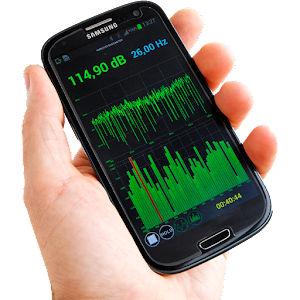
We have developed an application for spectral analysis of sound for Android.
The application Measuring Center for Android is simplified version of the program for PC, but it still has its reach functionality.
The interface of the program is intuitive and easy to use.
It supports both the wired Spl-Lab devices (USB BASS Meter, USB RTA Meter, etc.) and wireless devices, such as Wireless Bass Meter.
Also you can make measurements using build-it microphone of your phone or tablet!You can read the full manual herehttp://www.spl-lab.ru/download/SPL-LAB%20Measuring%20Center%20Android%20-%20User's%20Manual%20-%20EN.pdfFunctions:Build-it mic support for AFC measurements (full version)Measuring the amplitude-frequency characteristic (AFC) of a signal - displaying the spectrumDisplaying the signal waveformMeasuring the Total harmonic distortion (THD) Measuring the sound pressure level (SPL, dB Drag, IdBL, ESPL, AMT, etc)Linear, logarithmic and octave view of spectrumMeasuring the amplitude and frequency of the peak values of the spectrumMeasuring average level of sound pressure in time (Bassrace, Bass Boxing, AMT SPL-Show, etc)Measuring the average in time and whole spectrum sound pressure level (SQL)Supports the wired (full version) and wireless Spl-Lab devices
About Measuring Center
- Package name (App ID)
- com.spectroanalyz
- Available on
- Google Play
- Price
- Free
- Version
- v2.3
- Developer
- keuwlsoft
Looking for the Measuring Center APK?
The safest way to get Measuring Center (com.spectroanalyz) on your Android device is to install it directly from Google Play — you'll always get the latest official version, automatic updates, and no risk of modified or infected APK files from third-party sites.
Music Features
Enjoy high-quality music streaming and playback features.
Gaming Features
Enjoy immersive gaming experience with various game modes.
Productivity Tools
Boost your productivity with powerful tools and features.
See Measuring Center in Action


Frequently Asked Questions
Is Measuring Center free?
Yes, Measuring Center is free to download and install on Android through Google Play.
How do I install Measuring Center on Android?
Open Google Play on your Android phone or tablet, search for Measuring Center by keuwlsoft or tap the Google Play button on this page, then tap Install. The app downloads and installs automatically.
What is com.spectroanalyz?
com.spectroanalyz is the App ID (package name) of Measuring Center on Google Play. Every Android app has a unique package name, and it is the safest way to verify you are installing the official app.
Is Measuring Center safe to download?
Installing Measuring Center from Google Play is the safest option: you get the official version published by keuwlsoft, verified by Google Play Protect, with automatic updates. Avoid APK files from unofficial third-party sites.
Get Measuring Center Today
Measuring Center for Android — free download on Google Play.
Compatible with Android phones and tablets — available on Google Play.
Ask AI about this app
Get instant answers about features, tips and more from popular AI assistants.